
Download VectorArt.ai – AI-Powered Vector Image Generator for Windows, Mac, Android, iOS
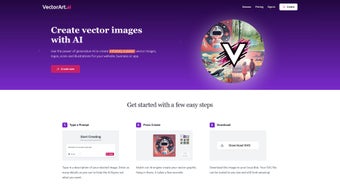
VectorArt.ai is a cutting-edge, web-based AI tool that transforms text descriptions and sketches into high-quality, infinitely scalable vector graphics. Designed for creatives, entrepreneurs, and designers, this software enables rapid generation of logos, illustrations, and branding assets using advanced generative AI. Whether you're crafting a startup logo or a marketing illustration, VectorArt.ai delivers professional-grade SVG and PNG files with just a few prompts.
The platform supports both Text-to-Image and Sketch-to-Image input, offering flexibility for users with varying skill levels. With a free tier available and a subscription model for advanced features, VectorArt.ai provides a secure, intuitive experience across all major operating systems, including Windows, Mac, Android, and iOS. No installation is required—access the tool directly through your browser, making it one of the most convenient AI design tools on the market today.
Key Features of VectorArt.ai
VectorArt.ai stands out in the crowded AI design space thanks to its powerful and intuitive feature set. At the core of the platform is its AI-driven vector generation engine, which converts natural language prompts or rough sketches into crisp, scalable SVG files. This means your designs never lose quality, no matter how large they’re scaled—perfect for print, web, or digital media. The Text-to-Image functionality allows users to describe their vision in plain English—like “a minimalist tech logo with a glowing circuit pattern”—and instantly receive a vector-ready output. For more visual thinkers, the Sketch-to-Image feature lets you upload a rough hand-drawn sketch or doodle, and the AI refines it into a polished vector illustration.
Another standout feature is the Style Library, which offers a wide range of illustration styles—from flat design and isometric to hand-drawn and futuristic. This allows users to maintain brand consistency or experiment with different aesthetics without needing design expertise. The platform also includes a royalty-free image library where you can browse AI-generated templates for inspiration or immediate use in your projects.
All generated files are downloadable in both SVG and PNG formats, ensuring compatibility with most design tools and publishing platforms. With a clean, responsive interface and no complex setup, VectorArt.ai is ideal for non-designers and professionals alike. Whether you're building a brand identity or creating content for social media, the tool streamlines the creative process with speed, precision, and scalability.
How to Install and Use VectorArt.ai on Windows, Mac, Android, and iOS
One of the biggest advantages of VectorArt.ai is that it’s a web-based application, meaning there’s no traditional installation required. You can access the platform from any device with a modern web browser—whether you're using a Windows PC, Mac, Android tablet, or iOS smartphone. Simply open your preferred browser (Chrome, Safari, Firefox, or Edge), navigate to vectorart.ai, and sign up for a free account. The registration process is quick and secure, requiring only an email address and password.
Once logged in, you’ll be greeted with a clean dashboard where you can start generating vector graphics immediately. To begin, click on the “Create” button and choose between Text-to-Image or Sketch-to-Image. For text prompts, be as descriptive as possible—include colors, shapes, style, and context.
For example, “a futuristic space station with golden arches and neon blue lights, in a flat vector style.” The AI processes your input in seconds and delivers multiple variations. You can then select your favorite, fine-tune it with minor adjustments, and download it in either SVG or PNG format. The SVG files are fully editable in vector software like Adobe Illustrator or Inkscape, making them perfect for professional use.
For mobile users, the platform is fully responsive, so you can sketch directly on your Android or iOS device using a stylus or finger. The mobile interface is optimized for touch, allowing you to upload sketches or type prompts on the go. All your projects are saved to your cloud account, so you can seamlessly switch between devices. While no native app is available yet, the web experience is so smooth and fast that most users don’t miss the app. Regular updates ensure improved AI accuracy, faster rendering, and new style options, keeping the tool ahead of the curve.
Compatibility and System Requirements
VectorArt.ai is designed to be accessible across a wide range of devices and operating systems. It supports Windows 10 and later, macOS 11 (Big Sur) and newer, Android 8.0 and above, and iOS 13 and above. Since it’s a cloud-based tool, the platform does not require specific hardware specifications—your device only needs a stable internet connection and a modern web browser. This makes it suitable for low-end laptops, tablets, and even older smartphones, as long as they can load a web page efficiently.
The platform is compatible with all major browsers, including Google Chrome, Mozilla Firefox, Apple Safari, and Microsoft Edge. It uses progressive web app (PWA) technology, which allows users to add the site to their home screen on mobile devices for a more app-like experience. This is particularly useful for designers who frequently work on the go. Additionally, VectorArt.ai supports cross-device synchronization, so your projects, preferences, and saved templates are always up to date across all your devices.
For users concerned about data security, VectorArt.ai employs end-to-end encryption for all user data and ensures that generated files are not stored on their servers beyond the user’s session unless saved to their account. This protects your intellectual property and ensures privacy. The platform also complies with GDPR and CCPA regulations, making it a trustworthy choice for both personal and business use. Whether you’re a solo creator or part of a design team, VectorArt.ai delivers consistent performance regardless of your device or operating system.
Pros and Cons of VectorArt.ai
- Pros:
- Generates infinitely scalable vector graphics in SVG format
- Supports both Text-to-Image and Sketch-to-Image AI prompts
- Free tier available with solid functionality
- Extensive style library for diverse design aesthetics
- Cloud-based—no installation, works on all major OS
- Fast rendering and intuitive interface
- Royalty-free usage for all generated content
- Cons:
- No native desktop or mobile app (only web-based)
- Advanced features locked behind subscription
- Requires detailed prompts for best results
- Limited built-in editing tools (export to external software)
- Dependent on internet connection for full functionality
Frequently Asked Questions (FAQ)
- Is VectorArt.ai free to use?
Yes, VectorArt.ai offers a free tier that allows users to generate a limited number of vector images per month. It’s perfect for testing the platform and creating small projects. For more advanced features like higher resolution exports, bulk generation, and access to premium styles, a subscription is required.
- Can I edit the generated SVG files?
Yes, all SVG files are fully editable. You can open them in vector editing software like Adobe Illustrator, Inkscape, or Figma to customize colors, shapes, and layers. This makes VectorArt.ai ideal for professional designers who need flexible, scalable assets.
- Does VectorArt.ai work on mobile devices?
Yes, the platform is fully responsive and works seamlessly on Android and iOS devices. You can create designs using your phone or tablet, either by typing prompts or sketching directly on the screen. While there’s no native app yet, the web experience is optimized for touch.
- Are the generated images royalty-free?
Yes, all images created with VectorArt.ai are royalty-free. You can use them for personal, commercial, or branding purposes without additional licensing fees. However, you must adhere to the platform’s terms of service regarding misuse or redistribution.
- How often does VectorArt.ai update its AI models?
Regularly. The development team releases updates every few weeks to improve AI accuracy, add new styles, and enhance rendering speed. These updates are automatic and require no action from the user.
Conclusion: Why You Should Download VectorArt.ai Today
VectorArt.ai is a game-changing tool for anyone who needs high-quality, scalable vector graphics without the steep learning curve of traditional design software. Whether you're a startup founder creating a logo, a social media marketer designing content, or a professional designer looking to speed up your workflow, this AI-powered platform delivers impressive results with minimal effort. Its ability to transform simple text or sketches into polished vector illustrations makes it one of the most versatile design tools available today.
With a free tier that’s genuinely useful and a subscription model that unlocks advanced features, VectorArt.ai strikes the perfect balance between accessibility and power. The cross-platform compatibility ensures you can work from anywhere—on Windows, Mac, Android, or iOS—while the secure, cloud-based architecture keeps your projects safe and synchronized.
Don’t miss out on the future of design. Download VectorArt.ai now and start generating professional-grade vector graphics in seconds. Whether you're building a brand or creating digital art, this tool is your creative partner in innovation.



.png)



